Design for the Web 1
Asst. Prof. Andy DeckWednesdays 2-4:50pm
City College, Spring 2018
ART 39540-3EF
+ Course Info
About
This course will enable students to approach real-world design problems using the Web as a medium and create solutions that are functional and engaging, and that apply industry-standard technologies, including CSS and HTML. Students will undertake a series of exercises, culminating in the creation of working web sites. Topics will include pre-planning, information architecture, visual and interface design, effective use of images and text, adapting code from outside sources, and other topics that may arise during the semester. Significant work is required in the computer lab outside of class meetings. Students will be expected to do independent assignments in order to learn a range of dynamic web technologies and to advance their design concepts and strategies. Class time will include lectures, technical demonstrations, guided lab time and time for critique of student work.
Goals
Write HTML5/CSS3; use the language of web design (terminology); design and develop sites from scratch; strengthen analytical skills and think critically; understand and use technologies associated with web design.
Preparation & Participation
During each class, you are expected to contribute to objectives of the course. Ask questions, discuss and critique student work, and help your peers if you can. Please turn off your cell phones and refrain from sending emails, texts or messaging friends during class. USING ANY FORM OF SOCIAL MEDIA DURING CLASS IS CONSIDERED NOT PARTICIPATING. Please be prompt, and return from breaks on time. You are expected to read and conduct relevant research each week. You don't need to understand each and every word, but you should come to class having done the reading, and prepared to discuss it meaningfully.
Learning Outcomes
Students will:• Create websites with HTML/CSS3 [homework, readings, projects]
• Gain an understanding of contemporary web design [readings, homework, discussions]
• Recognize and learn best practices used by web designers [readings]
• Critically analyze web sites [discussion, homework]
Demonstrate what is learned in class [discussion, homework]
Attendance
Attendance and class participation are an essential element of this course. Each class gives unique and valuable information not available in the readings. As such, any missed class will affect your grade. Missing three classes, will result in failure of the course. If you miss a class, you are still responsible for handing in the assignment and completing the readings. Refer to the companion web site for the class, and contact your peers or me before the next class to get caught up. Please refer to campus info sources for school closings.Communication
The email address you give on the first day of class will be used to communicate with you about all course-related matters. Please check it regularly.Academic Integrity
Students are expected to read and understand CUNY's [academic integrity policy] which prohibits cheating and plagiarism. Members of the CUNY community are expected to be honest and forthright in their academic endeavors. Students who violate this policy will be referred to the Office of the Provost.Students with Disabilities
If you need accommodations because of a documented disability, notify the instructor.Readings
• Required: HTML and CSS: Design and Build Websites, Author: Jon Duckett, Publisher: Wiley, Edition: 1, Year Published: 2011, Price: $17.00• Reading expectations are mentioned in the schedule below
Materials
• Portable (USB) storage media. Use it and make back-ups of your work. USB3 recommended.• Pencil / pens and sketchbook are still a professional starting point.
Requirements
• Reading and research• 2 interactive tutorials
• Weekly homework assignments
• 2 major assignments
• Final project (responsive website)
Final Grade
Your final grade will be based on:| 15% | Attendance and class participation | 10% | Interactive HTML/CSS tutorials / quiz | 40% | Eight homework assignments (main index, principles, review, paintings, font pairs, diy, fixed, acme) | 10% | Social issue mid-term | 10% | Portfolio | 15% | Final website (responsive) |
Grading
Incomplete grades are given only in the case of family emergency or documented illness which interferes with your completion of the course. You must submit the required paperwork to me according to the college's deadline. You must also submit to me a written list of work which is missing, and a timetable of when the work will be completed.
Schedule
Class 1 1/31
In ClassCourse overview. Discussion of HTML basics.
Homework for next class:
1. Get the Duckett book and read the first two chapters. 2. Download an FTP client, like CyberDuck, at home. 3. Download a text editor, like SublimeText. 4. Use the text editor to practice formatting text with basic HTML. Continue formatting the [web design principles] text used in class. 5. Find and *briefly* review five websites you admire, make URL hyperlinks, and format your review text. These HTML exercises (parts 4 and 5) will be uploaded to your server space in class on 2/7.
Class 2 2/7
In ClassDiscussion of accounts, uploading to the server. HTML/CSS continued.
Homework for next class:
1. Make 'review' and 'principles' folders on the server. 2. Upload those documents from week one and develop them further with CSS. 3. Begin working on the required [Learn HTML tutorial]. 4. Read 5 of Duckett.
Class 3 2/14
In ClassStyling with CSS (continued). Using absolute positioning.
Homework for next class:
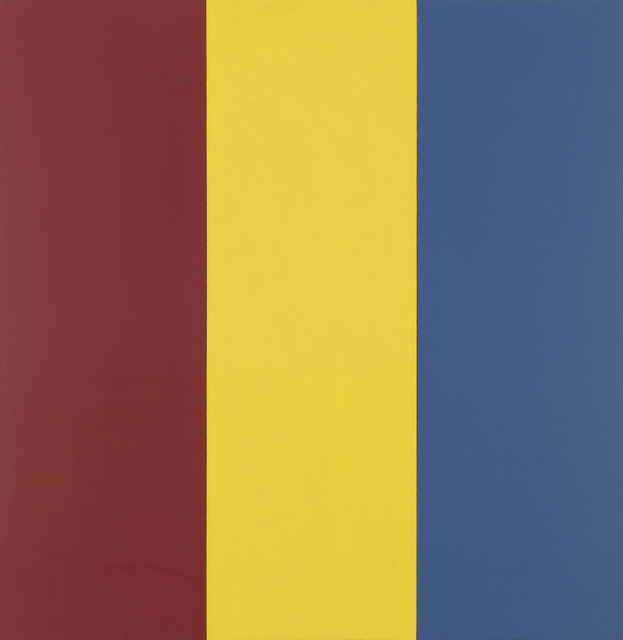
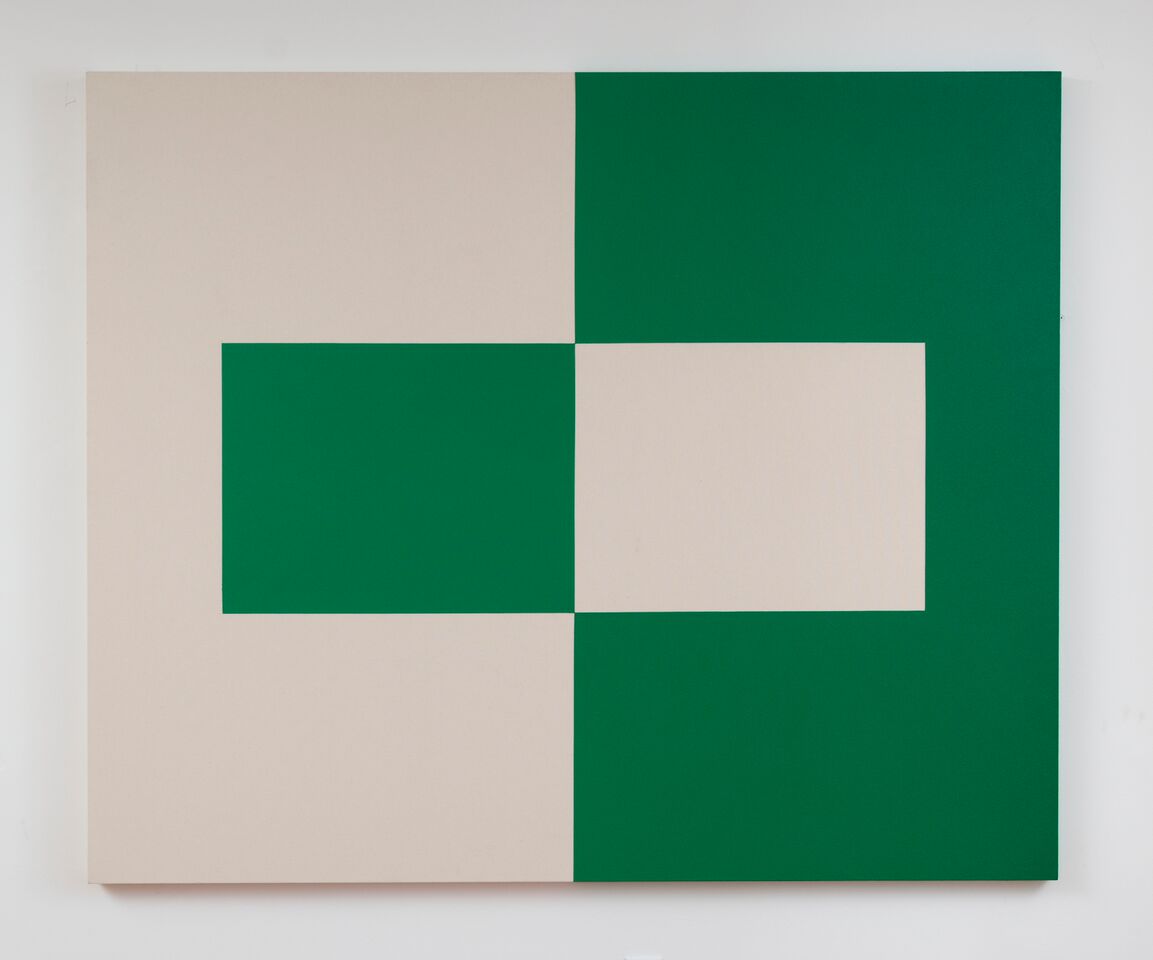
1. Read from Duckett chapters 4 and 10. 2. Begin working on the required [Learn CSS]. 3. Make a folder named 'paintings'. 3. Create an html file recreating at least five of these paintings using divs and CSS. 4. Link the folder to your top level index page (navigation buttons a plus):
a. Peter Halley's Apartment House (1981)

b. Bridget Riley's Rose Rose (2011)

c. Mary Heilmann's Pink Summer (2000)

e. Brice Marden's Red Yellow Blue 1 (1974)
f. Agnes Martin's Happy Holiday (1999)

g. Ellsworth Kelly's Méditerranée (1952)

h. Carmen Herrera's Alba (2014)
Class 4 2/21
In ClassIntro to grid systems. Typographic techniques for the Web.
Homework for next class:
1. Download Skeleton framework from getskeleton.com. 2. Unzip and rename the folder to 'fontpairs'. 3. Place any .otf font files you intend to use in the css/ folder. 4. Add a <link> line in the <head> section as detailed by Google Fonts (to load any additional fonts). 5. Establish five font pairs using a two-column layout, with one row dedicated to each font pair. 6. Read from Duckett chapters 11 and 12.
Class 5 2/28
In ClassWeb graphics, SVG, scaling and resolution issues
Homework for next class:
1. Begin working on the required [Responsive design tutorial on codecademy.com]. 2. Make a folder 'diy'. 3. Photograph a process that you know about in at least six steps. 4. Code the image tags. 5. Add text that narrates the steps. 6. Using display: and width: style rules, and responsive design with @media queries, make the images fill half the width in wider views, and all of the width on mobile (narrow) views.
Class 6 3/7
In ClassScroll navigation for vertical layouts. Quiz or Codecademy done.
Homework for next class:
1. Make a folder named 'issue'. 2. Begin work on a four section website involving a social issue. 3. Produce a mock-up of each section. 4. Develop original content (written and graphical). 5. Read Duckett chapter 13.
Class 7 3/14
In ClassLayout, image tricks, figures.
Homework for next class:
1. Make an index.html inside 'issue'. 2. Continue work on the four sections. 3. Produce a final version for 3/21 (mid-term critique).
Class 8 3/21
In ClassMid-term critique
Homework for next class:
1. Make folder 'fixed'. 2. Follow hand-out model to produce a single scrolling page with a fixed header. 3. Use a width="100%" scaled SVG as the src content of an <img> tag in the header. 4. Read Duckett chapter 15.
Class 9 3/28
In ClassPortfolio design concepts and techniques
Homework for next class:
1. Make a folder named 'portfolio' and begin work on a built-from-scratch simple portfolio. 2. Incorporate strategies like lightbox or slideshow or timeline-layout.
Class 10 4/18
In ClassjQuery intro
Homework for next class:
1. Continue work on portfolio. 2. Establish responsive alternatives for landscape and portrait view modes. 3. Read jQuery handout.
Class 11 4/25
In ClassjQuery (cont.) with templates
Homework for next class:
1. Make a folder 'acme'. 2. Produce a very basic page layout template. 3. Add jQuery to the document. 4. Enable jQuery linking from several buttons that 'injects' new content into the center of the layout.
Class 12 5/2
In ClassPHP and templates: basic server-side scripting
Homework for next class:
1. Develop a plan and do research for your final project. 2. Imagine users. 3. Sketch layout possibilities and think about design elements like color, texture, pictures, compositions, etc.
Class 13 5/9
In ClassBootstrap framework and its mobile/desktop menu
Homework for next class:
1. Continue work on final project website. 2. Add folder 'final' and place your index.html there. 3. Add sub-folder 'dev' inside it and place any developmental wireframes, experiments, mockups there.
Class 14 5/16
In ClassBootstrap framework grid system
Homework for next class:
1. Continue work on final site.
Class 15 5/23
In ClassFinal critique
Required:
Update your index page to reflect (link) all your coursework.